Step 1: What is safe repricing?
Amazon prices can change suddenly — a product might spike from £20 to £200 due to a listing error, or drop to £1 during a flash sale. Without protection, these extreme prices would automatically update your eBay listing, potentially causing you to sell at a massive loss or price yourself out of the market.
Safe repricing is your safety net. When a supplier price moves more than you are comfortable with, it takes the listing off sale rather than letting the unusual price reach your buyers — and puts it back automatically once the price settles.

Step 1: What is safe repricing?
Step 2: How it protects you
Every few hours Coderom looks at the supplier prices it has recorded for a product over the monitoring period (3 days by default). It takes the highest and the lowest of those prices and works out how far apart they are, as a percentage of the lowest. That single figure is what your threshold is compared against.
This is a range, not a direction. A price that climbed and a price that fell produce the same figure, so a £10 supplier price is treated the same whether it moved to £16 or down to £6.25. There is one threshold, and it covers both.
If that figure goes over your threshold, Coderom:
- Takes the listing off sale — the eBay quantity is set to 0, so nothing can be bought at a price based on volatile data
- Leaves the listing itself in place — it is not ended or deleted, and it keeps its history and watchers
- Records why — the product shows a Safe Repricing badge with the measured change, and appears under the Safe Repricing filter in Products
- Puts it back on sale by itself once the price has settled — you do not have to approve anything

Step 2: How it protects you
Step 3: Enable safe repricing
- Go to Settings → Pricing
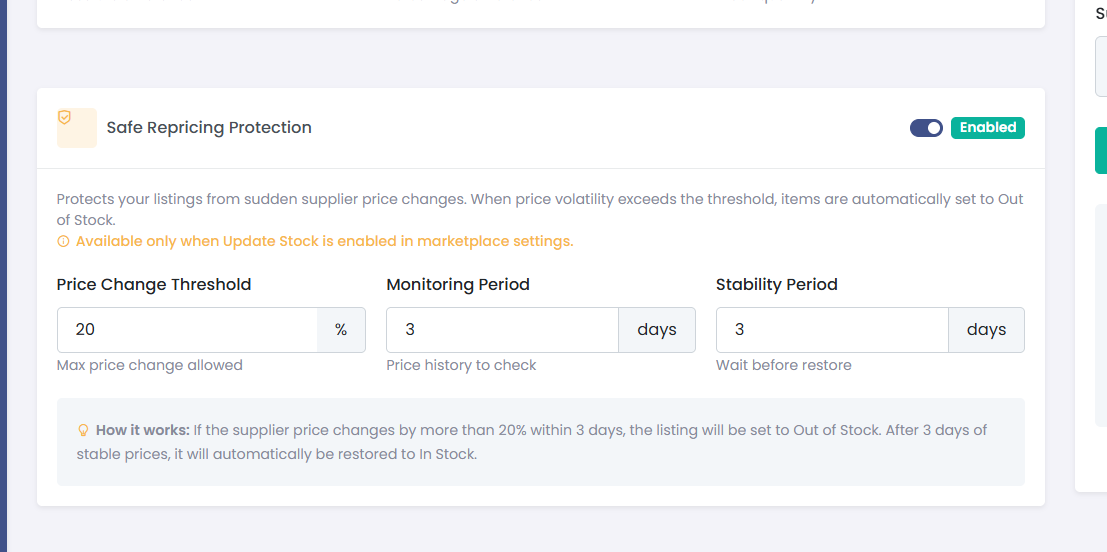
- Find Safe Repricing Protection
- Toggle it On
- Click Save
Step 3: Enable safe repricing
Step 4: Set your threshold
There is a single threshold, plus two timing settings. All three live in Settings → Pricing → Safe Repricing Protection.
| Setting | What it does | Recommended |
|---|---|---|
| Price Change Threshold | How far the supplier price may range before the listing comes off sale. Allowed values are 20 to 80. | 60% (default) |
| Monitoring Period | How far back Coderom looks when measuring that range. | 3 days (default) |
| Stability Period | How long to wait before checking whether the price has settled. | 1 day (default) |
Presets are offered next to the field, and you can type any value between 20 and 80:
- 30% — Sensitive. Catches ordinary supplier movement; expect a noticeable share of your catalogue to be off sale at any time.
- 40% — Balanced.
- 60% — Recommended. The default. Ignores everyday price movement and reacts to genuine spikes.
- 80% — Relaxed. Only the most extreme changes take a listing off sale.
Two worked examples at the default threshold of 60%:
- A supplier price moves between £6.39 and £7.99 over three days. That is a 25% range — under 60%, so nothing happens and the listing stays on sale at its repriced value.
- A supplier price is read as £6.96 and then as £139.20. That is a range of about 1,900% — far over 60%, so the listing comes off sale rather than being republished at a price built on that reading.
Step 5: What happens when protection triggers
When the measured range goes over your threshold:
- The eBay quantity is set to 0, so the listing stays live but cannot be bought
- In Products the row shows a Safe Repricing badge with the measured percentage, and the Safe Repricing filter under Out of Stock lists everything currently held back
- Coderom keeps checking the product on its normal schedule
Putting it back on sale is automatic and needs nothing from you. Once the stability period has passed, Coderom measures the price range again — starting from the moment the listing came off sale, not over a fixed trailing window. If the price has not moved since then, the listing goes back on sale.
Measuring from that moment matters: if it looked back over the last few days instead, it would still see the very movement that took the listing off sale, and would take it off sale again within hours of restoring it.
Two things decide the quantity it comes back with:
- The quantity is taken from the last figure Coderom worked out for that listing, so it matches what your stock settings would have set anyway. If the supplier is out of stock, that figure is 0 and the listing stays closed — it will not be reopened with stock that is not there.
- The product must have been checked in the last 24 hours. If its data is older than that, restoring is postponed to the next round rather than done on stale figures.
A price that moved and then stayed at its new level does restore — at the new price. Coderom does not wait for it to return to what it was before.
Was this helpful?
Still need help? Browse all articles or contact support.